Live chat integration: a practical rollout guide for decision-makers

For most operators, the fastest route to value is a SaaS embed script paired with CRM webhook mapping and clear escalation rules. This gets a chat widget live in hours, syncs conversations into your existing systems, and keeps humans in control of anything risky. Before your engineer touches a line of code, you need four things sorted.
- Admin access to the chat vendor and your CRM/helpdesk
- API keys or a service account for two-way syncing
- A signed-off consent and privacy position for the chat cookie
- A named owner for escalation rules (usually the support lead, not engineering)
Assign the technical install to an engineer, the routing logic to your support lead, and overall sign-off to a project owner who can say “go” once testing clears.
Table of Contents
- What do you need before you integrate live chat?
- Which live chat integration method should you choose?
- How do you map chat data to your CRM?
- What escalation rules protect against misrouted chats?
- How should you test and roll out live chat integration?
- Which metrics show your live chat integration is working?
- How does Agentria approach compliant chat integration?
- A compliance-ready path to live chat for casino operators
- Sources
What do you need before you integrate live chat?
Rushing straight to installation is how teams end up with duplicate CRM contacts and chat transcripts nobody can search six months later. Sort the groundwork first.
- Collect credentials. Get vendor admin login, API keys, and a dedicated CRM service account rather than a personal login that breaks when someone leaves.
- Confirm site access. Check who can edit your site’s header code or Google Tag Manager container, since most chat widgets go live through one of those two routes.
- Review consent requirements. If you operate in markets with cookie consent rules, decide whether chat loads by default or only after consent, and document the retention period for transcripts containing personal data.
- Notify stakeholders. Loop in whoever owns your CRM data model, your compliance or legal contact, and your support team lead before the widget goes live, not after.
Skipping step three is the most common regret. Retrofitting consent logic onto a widget that’s already collecting player emails is far messier than building it in from day one.
Which live chat integration method should you choose?
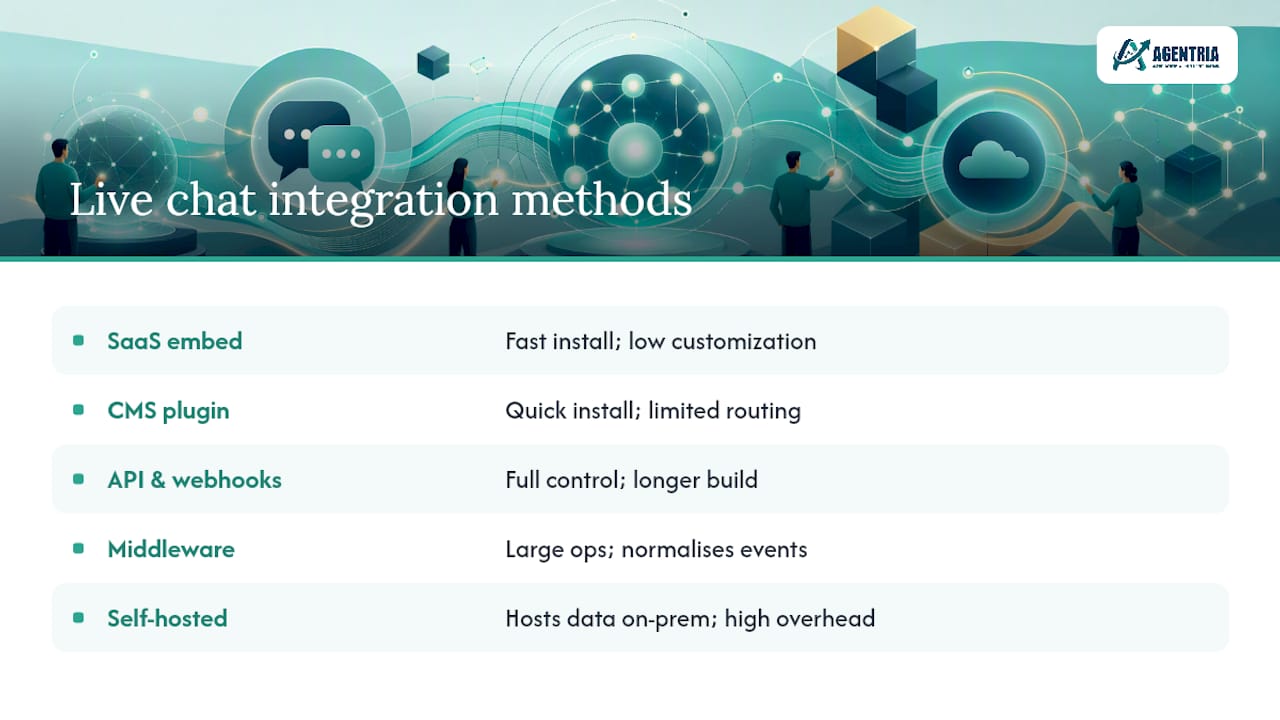
There isn’t one right answer; there’s a right answer for your team’s size, risk tolerance, and how much developer time you have spare this quarter. Five methods cover almost every scenario.
SaaS embed script. A single line of JavaScript dropped into your site header is the most common fastest path to a live chat widget, and most vendors offer this as the default install. Time-to-value is measured in hours, but you’re paying an ongoing subscription and inheriting whatever limits the vendor sets on customisation.
CMS or plugin install. WordPress and Shopify both have chat plugins that install in minutes and often connect to your existing CRM plugins with no code at all, such as the free OpenWidget customer service tools plugin. Good for smaller teams; less flexible once you need custom routing logic.
API and webhooks. This is the route for anyone who needs identity passing, custom event triggers, or tight security controls like signed webhooks and rate limiting. It takes longer to build but gives you full control over what data moves where.
Middleware or iPaaS. Larger operators often insert a middleware layer to normalise chat events before they hit the CRM, enriching records with account data or risk scores along the way.
Self-hosted widget. Rare, but worth it if data residency rules force you to keep transcripts on your own infrastructure. Expect higher hosting overhead in exchange for full control.
Pro Tip: Embed snippets typically work identically across plain HTML, React, Webflow, and Squarespace, so if you’re running multiple properties, check whether one platform-specific install guide covers all of them before commissioning separate builds.
How do you map chat data to your CRM?
Get the identity key wrong here and you’ll spend the next year untangling duplicate contact records. Decide on your sync set before you flip the switch, not after.
- Minimum fields to sync: contact ID or email, session ID, full transcript, applied tags, and UTM source data
- Identity key: email is the most reliable merge key for most B2C operators; a hashed player ID works better where email addresses change
- Contact vs ticket-only records: create a full CRM contact for anyone who converts or has an existing account; log anonymous browsing chats as ticket-only to avoid cluttering your database
- Transcript storage: index transcripts by tag and timestamp, not just contact ID, so support leads can search “payment delay” across every conversation rather than one player at a time
Pre-filling identity fields when the widget loads (passing a logged-in user’s email or ID automatically) cuts friction for the player and reduces duplicate CRM records compared with asking them to re-enter details every session. AGENTRIA’s feature set handles this identity mapping across email, live chat, SMS, and Telegram from one dashboard, so a player’s history follows them regardless of channel.
What escalation rules protect against misrouted chats?
Escalation logic is where most live chat integration projects either earn their keep or quietly create a compliance headache. Build rules around clear, measurable triggers rather than vague “if unsure, escalate” logic that agents can’t audit later.
- Intent confidence threshold. Route to a human whenever the AI’s confidence in understanding the request falls below a set score, commonly a confidence score in the high seventies to low eighties range.
- Sentiment threshold. Flag conversations where sentiment scoring detects frustration or distress above a defined level, regardless of what the player is actually asking.
- Transactional triggers. Any request touching deposits, withdrawals, account verification, or self-exclusion should route to a human by default, no exceptions.
- High-risk categories. Financial disputes and account security requests need human-only handling every time, not just when confidence is low.
Before any of this goes live, simulate the new rules against historical conversation data to see how they would have handled real past tickets. This is the single step most teams skip, and it’s the one that catches the edge case where a “confidence 82%” chat should have gone to a human anyway.
Every handoff should carry a brief AI-generated summary, the full transcript, applied tags, and the reason for escalation. Concise briefing at handoff measurably reduces the time agents spend gathering context before they can actually help.

How should you test and roll out live chat integration?
Don’t flip the switch for every player on day one. A staged approach catches problems while the blast radius is still small.
- Run rule simulations first. Test new escalation logic against a sample of historical tickets before touching live traffic; this is where most misrouting bugs surface.
- Stage identity and transcript tests. Confirm the correct contact record populates, the transcript saves in full, and handoffs carry the right context.
- Pilot with a defined group. Run the new integration with a subset of traffic, perhaps a small subset of traffic for a short period.
- Set rollback triggers. Agree in advance what escalation error rate or CSAT drop triggers a pause, not after you’ve already seen it happen.
- Brief agents properly. Walk your support team through what a handoff summary looks like and where to find full context before go-live day.
Pro Tip: Treat the pilot’s gating metric as non-negotiable. If escalation errors increase beyond your agreed threshold during the pilot, that’s the signal to pause and retest, not a reason to extend the pilot and hope it settles.
Which metrics show your live chat integration is working?
Key performance indicators such as average handle time, escalation rate, bot containment rate, customer satisfaction, and first-contact resolution provide vital insights into how effectively your live chat integration functions and help identify issues early.
Build alerts around sudden shifts, not just weekly averages. A spike in escalation rate on a Tuesday afternoon is worth investigating immediately, not in next month’s report.
Review routing rules monthly at minimum, and retrain or retune models whenever you notice drift in confidence scores. Keep every AI-generated reply, human review decision, and escalation reason logged in a searchable audit trail. Regulated operators will need this the first time a compliance question comes up, and rebuilding a trail after the fact is far harder than logging it from day one.
How does Agentria approach compliant chat integration?
AGENTRIA was built specifically for the constraints regulated operators face, not as a generic chat tool with compliance bolted on afterwards.
- Combines multiple AI providers with a review gate you set per brand
- Integrates email, live chat, SMS, and Telegram into one system for context-aware responses informed by each player’s VIP tier and history, detailed on the features page
- Produces a full audit trail of every AI-generated decision, meeting the documentation demands of regulated gambling markets
- Delivers faster response times and clearer operational analytics without asking operators to sacrifice oversight
What I’d prioritise first
The three pitfalls that sink most rollouts: skipping rule simulation, ignoring identity mapping until duplicates pile up, and treating escalation as an afterthought. Fix routing and audit trails first. Regulated operators need that oversight from day one.
— AGENTRIA
Live chat integration works best when a fast embed or API install is paired with tested escalation rules and a permanent human review layer over every automated reply.
| Point | Details |
|---|---|
| Choose your method by risk, not speed | SaaS embeds go live fastest; API and middleware routes suit teams needing custom identity and routing control. |
| Fix the identity key early | Pick email or hashed player ID as your CRM merge key before launch to avoid duplicate contact records. |
| Simulate before you launch | Test escalation rules against historical tickets to catch misrouted high-risk intents before real players hit them. |
| Track five core KPIs | Monitor AHT, escalation rate, bot containment, CSAT, and resolution rate weekly, with alerts on sudden shifts. |
| Agentria adds compliance-ready oversight | Agentria pairs multi-provider AI with a review gate you configure per brand and full audit trails for regulated casino operators. |
A compliance-ready path to live chat for casino operators
If you run player support for an online casino, you’ve likely already ruled out generic chat widgets, they weren’t built for gambling regulation, VIP-aware answers, or responsible gambling triggers. AGENTRIA was. It combines multiple AI providers with a review step you configure per brand, so you choose where automation’s speed stops and sign off begins, without losing the audit trail regulators expect.
Support teams coming from this guide typically want the same thing: escalation rules that actually work, CRM data that doesn’t fragment across channels, and a system that proves compliance rather than just claiming it. AGENTRIA’s player support platform unifies email, live chat, SMS, and Telegram under one dashboard, with responsible gambling detection built into the routing logic rather than added as an afterthought. If your current setup can’t dry-run escalation rules in a sandbox before they hit live traffic, or show you who reviewed what and when, book a demo and see how the human-in-the-loop model handles your actual player volume.
Sources
For script and API patterns, see the live chat embed tutorial and Dialogflow CX’s conversation history documentation. Operators managing admin workflows can also review AGENTRIA’s own Help Center, which documents the admin panels, escalation workspace and audit log in full.
- Dialogflow CX — conversation history and testing
- How to add live chat to your website (2026 tutorial)
- AI customer service escalation: rules, triggers & handoffs
Recommended
See AGENTRIA on your support workflow
Book a walkthrough tailored to your brands, channels, and compliance requirements.