Tiered, Privacy-First Age Verification Messaging for Operators

Prioritise privacy-preserving, tiered age assurance: run lightweight checks first (email or database signals) and reserve deterministic ID or biometric verification for cases where confidence is genuinely low. Before writing a word of copy, confirm which regulator applies (the EU’s age-verification framework, Ofcom under the Online Safety Act, or a local carrier’s SMS rules), and keep every message short, honest about what’s being checked, and free of unnecessary data collection.
TL;DR:
- Conduct tiered checks starting with lightweight methods like email or database signals, reserving biometric verification for only low-confidence cases.
- Clearly inform users about what is being checked, why, and what happens after, placing messages at relevant stages such as signup or content access.
- Regulators expect methods that protect user privacy, provide audit trails, and justify verification choices; always justify your selected approach.
- Minimize stored personal data by recording only verification outcomes and metadata, and retain records with role-based access and deliberate retention policies.
- Use a centralized system to route age-verification messages across channels, ensuring consistency, human review, and clear audit trails to build user trust and regulatory compliance.
Table of Contents
- What age verification methods mean for your messaging
- How should an age verification message be worded?
- What do regulators expect from age verification systems?
- How much personal data should age checks actually keep?
- How does a tiered verification waterfall work technically?
- What are the SMS-specific rules for age gating?
- How Agentria manages age-verification messaging at scale
- What happens when age verification fails or returns unclear results?
- How do you communicate consent clearly during age checks?
- How can businesses build trust while requesting age data?
- Is your age verification messaging accessible to everyone?
- How should age verification messages adapt across markets?
- What actually matters most in age verification messaging
- Put privacy-preserving age assurance on autopilot
- Sources
What age verification methods mean for your messaging
The method you choose dictates the message you write. Get the sequencing wrong and you either annoy legitimate adults with needless friction or expose the business to a compliance gap.
ID and document verification is the heaviest option and should be flagged as such before it happens. Tell users why a document is needed, what happens to the image afterwards, and roughly how long the check takes. Users abandon far more readily when a document request arrives with no warning.
Biometric or facial age estimation needs consent language that’s specific about the camera capture, not a generic “we use AI” disclaimer. State plainly that the image is used to estimate age and, ideally, confirm whether it’s retained or discarded immediately after the estimate.
Invisible database checks run without any user action, which means your only messaging job is disclosure, not consent collection. A line in the privacy notice explaining that an age signal check may run in the background is usually sufficient.
Email-based age estimation works by matching an email address against transactional and commercially available data signals, returning a decision in seconds without opening the inbox. Providers like Agemin position this as a first-pass check precisely because it’s fast and low-friction, though it carries less legal weight alone than a database or document check in high-risk categories, as EFF’s overview of age assurance methods makes clear.
How should an age verification message be worded?
Every age-gating message, regardless of channel, needs four things to actually work: a stated reason, a clear required action, a plain description of what’s being verified, and what happens next.
- State the reason first. “This content is age-restricted” beats “Please verify your identity” because it tells the user why before it tells them what.
- Name the action plainly. “Enter your date of birth” or “Confirm via a quick selfie check” leaves no ambiguity about what happens if they tap continue.
- Describe what’s actually checked. Tell users whether you’re confirming an age threshold or verifying full identity. These are legally and perceptually different requests.
- Explain what happens next. If the check fails, say so and offer a next step (appeal, alternative method, or exit) rather than leaving a dead end.
Placement matters as much as wording. Signup forms need the gate before account creation, not after. Gated content pages need it at the point of access, not buried in terms and conditions. SMS programmes need it before the opt-in message is sent, never bundled with it.
Pro Tip: Keep the first-touch message under 20 words. A birthdate prompt that reads “Confirm you’re 18+ to continue. We don’t store this beyond verifying your age.” converts better than a paragraph explaining your compliance policy.
What do regulators expect from age verification systems?
Regulatory expectations differ by jurisdiction, but the direction of travel is consistent: privacy-preserving methods, proportionate friction, and a paper trail you can produce on demand.
- The EU’s approach to age verification pushes for harmonised, privacy-preserving, interoperable methods that let users prove age without handing over unrelated personal data.
- Ofcom requires “highly effective” age checks for services carrying pornographic content under the UK Online Safety Act from 2025, and expects providers to balance that effectiveness against user privacy while keeping auditable records of how checks were performed.
- Carriers apply their own layer on top of both. SMS and A2P messaging platforms routinely require pre-opt-in age gating for restricted categories, and Twilio’s error documentation shows that campaigns can be rejected outright if verification evidence is missing or weak.
None of these bodies mandates a single method. All of them expect you to justify your choice and show your working if asked.
How much personal data should age checks actually keep?
Data minimisation isn’t a nice-to-have here, it’s the compliance strategy. Where the law permits, store the verification decision and a minimal metadata trail rather than the underlying document or biometric image itself.
- Keep a record of what was checked, when, and the outcome (pass, fail, step-up triggered), not the raw ID scan or selfie behind it.
- Any privacy notice attached to a verification prompt needs the purpose of the check, how long the record is kept, and how a user can appeal a wrong decision.
- Audit trails should sit behind role-based access, with retention windows set deliberately rather than left open-ended by default.
Regulators increasingly treat “we deleted it after checking” as a feature, not a limitation. Retaining less is rarely a compliance risk; retaining more almost always is.
How does a tiered verification waterfall work technically?
The waterfall pattern, invisible check first, estimation second, document verification last, is now treated as an industry default rather than an edge-case optimisation, as Veriff’s age assurance guidance describes. Each tier needs its own messaging trigger.
- Tier one (invisible): no visible message unless the check fails, since nothing was asked of the user.
- Tier two (estimation): a short consent message explaining what’s being estimated and how, shown before capture or submission.
- Tier three (document): the heaviest disclosure, shown before the upload flow starts, not after.
On the API side, every response should carry a pass/fail flag, a confidence score, a step-up reason code, and a human-review flag so downstream systems know exactly why a user was escalated. Set a latency target for each tier (sub-second for invisible checks, a few seconds for estimation) and always build a human escalation path for the genuinely ambiguous cases that automated scoring can’t resolve cleanly.
What are the SMS-specific rules for age gating?
SMS carries its own, stricter rulebook. Carriers generally reject campaigns that rely on a single “reply YES” as proof of age, treating it as too weak to satisfy their compliance requirements.
- Run the age gate on a web-hosted page or verification link before the SMS opt-in, not inside the text message itself.
- Keep pre-opt-in wording minimal: “Confirm you’re 18+ to receive these messages” with a link, satisfies most carrier expectations without adding friction.
- Avoid SMS entirely for the highest-risk categories where a carrier or platform (see Klaviyo’s and ClickSend’s guidance) explicitly disallows it.
How Agentria manages age-verification messaging at scale
Consistency across channels is where most operators lose control. Agentria routes verification prompts and step-up fallbacks across email, SMS, live chat and Telegram from a single admin dashboard, so a player sees the same gating logic regardless of where they land.
Every AI-generated message, including verification and rejection notices, passes through human review before it reaches a player, which cuts false rejects and gives compliance teams an adjudication record regulators can actually inspect. Configurable retention settings keep the audit trail intact while limiting how much personal data sits in the system at rest, addressing exactly the minimisation concern regulators raise most often. The full feature set covers how these controls map onto day-to-day operations.
What happens when age verification fails or returns unclear results?
Failure handling is where most age-gating flows quietly break trust. A hard rejection with no explanation reads as arbitrary, and users who believe they’re old enough will often just leave rather than retry.
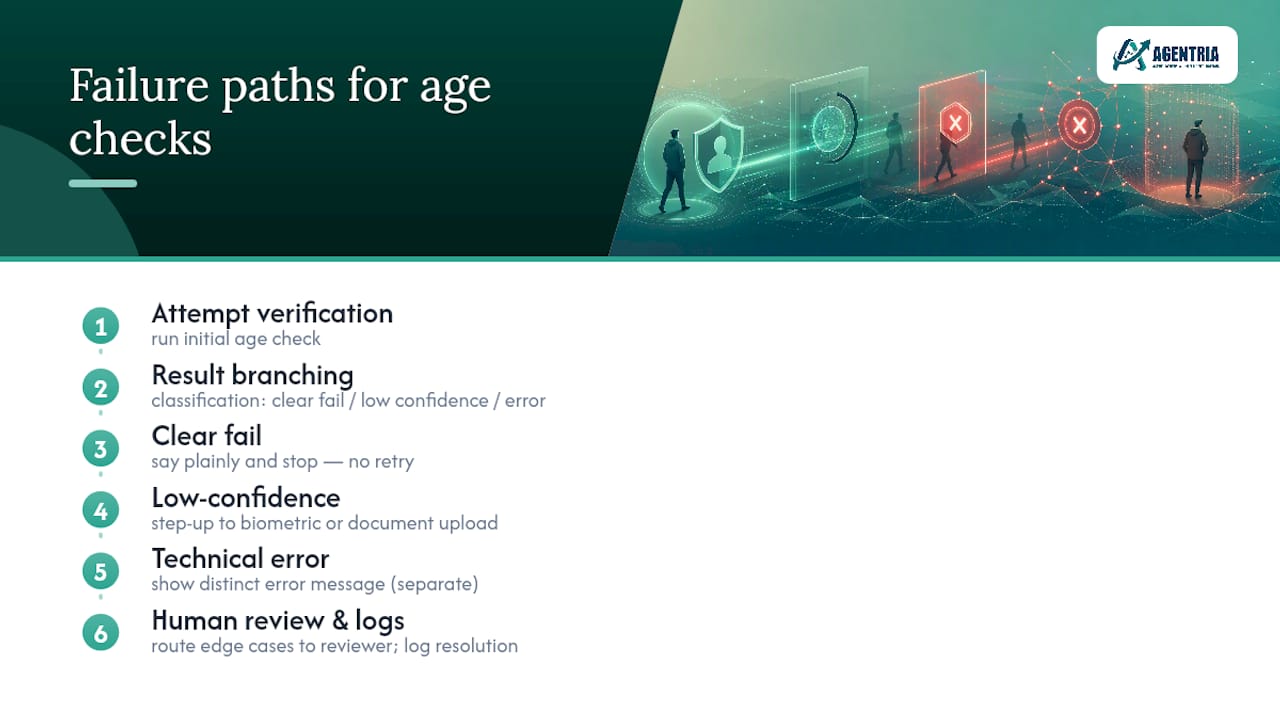
Build three distinct paths. A clear fail (the system is confident the user doesn’t meet the threshold) should say so plainly and stop, without inviting repeated attempts that look like an attempt to circumvent the check. A low-confidence result should trigger step-up rather than automatic rejection, moving the user from an email or database check to biometric estimation or document upload with a message that explains why the extra step is needed. A technical error (camera failure, upload timeout, API timeout) needs its own message entirely, separate from an age failure, because conflating the two erodes trust in the whole system and generates needless complaints.
Always give a route to human review for edge cases: someone whose ID has an unusual format, whose face doesn’t estimate cleanly, or whose email lacks enough signal history. Agentria’s human-in-the-loop model exists partly for this reason: an AI-flagged ambiguous case gets a real reviewer before the player sees a final answer, rather than an automated rejection that might be wrong.

Log every exception with its resolution path. Regulators reviewing your audit trail want to see not just that checks ran, but how disputed or unclear outcomes were resolved, and by whom.
How do you communicate consent clearly during age checks?
Consent language fails most often not because it’s dishonest, but because it’s vague. “We may use your data to verify your age” tells the user nothing about what’s actually happening.
State the specific action being taken at the specific moment it happens. If a selfie is captured for estimation, say “this image estimates your age and is not stored” or “this image is retained for 30 days for audit purposes”, whichever is true, rather than a blanket privacy policy link. If a database check runs invisibly, disclose that it may happen in the background rather than pretending no check occurs.
Separate consent for the verification itself from consent for any secondary use of that data (marketing, analytics, fraud scoring). Bundling them into one checkbox is a common shortcut that regulators increasingly flag, and the EU’s age-verification framework explicitly favours methods that avoid users having to disclose more than the age threshold itself.
Transparency also means telling users what happens if they decline. “If you don’t confirm your age, you won’t be able to access this content” is a fair trade-off stated honestly. Silence on the consequence, followed by a mysterious blocked page, damages trust far more than the gate itself.
How can businesses build trust while requesting age data?
Trust erodes fastest when a request feels disproportionate to the content behind it. Asking for a full ID scan to view a low-risk age-gated article feels invasive; the same request before a high-stakes transaction feels reasonable. Match the intrusiveness of the check to the actual risk.
Explain the “why” before the “what”. Users who understand that a check exists to meet a specific legal requirement, rather than an arbitrary company policy, tend to comply with far less friction. Naming the regulation or standard behind the request (even briefly) does more for trust than any amount of reassuring copy.
Give users a visible, working route to challenge a wrong decision. An age-estimation system that occasionally misjudges someone in their early twenties needs an accessible appeal path, not a dead end. The absence of that path is one of the fastest ways to convert a minor inconvenience into a public complaint.
Consistency across sessions matters too. A user who was verified last month shouldn’t be asked to prove their age again from scratch unless something about the risk profile changed. Repeated, unexplained re-verification reads as either incompetence or surveillance, neither of which builds confidence.
Is your age verification messaging accessible to everyone?
Accessibility gets treated as an afterthought in age-gating flows far too often, which is a problem given how many of these flows are legally mandatory rather than optional.
Screen reader compatibility matters most at the exact point users are most likely to abandon: the initial gate. Every prompt, error state, and consent checkbox needs a proper label, not just a placeholder, so assistive technology can announce what’s actually being asked.
Biometric and selfie-based checks create a genuine access gap for users with visual impairments who can’t confirm camera framing, and for users with certain motor or facial differences whose estimation confidence may run lower for reasons unrelated to age. A working fallback to an alternative method (document upload, database check, or human review) isn’t a nicety here, it’s often the only way the flow remains usable at all.
Language and cognitive load deserve attention too. Long consent paragraphs written in dense legal phrasing exclude readers with lower literacy or non-native fluency just as effectively as a missing screen-reader label. Short, direct sentences with a clear single action per screen serve accessibility and conversion simultaneously, which is a rare case where the two goals point the same direction rather than pulling apart.
How should age verification messages adapt across markets?
A message that reads as reassuring in one market can read as intrusive, or simply confusing, in another. Age-of-majority thresholds vary by jurisdiction and by content category, so a single hardcoded “18+” gate will misfire the moment it’s deployed somewhere the relevant threshold is 21, or 16 for a specific category.
Translation alone isn’t localisation. A direct translation of “we use AI to estimate your age” can land as alarming in markets with lower general trust in automated decision-making, and reassuring phrasing needs to be rebuilt for that context rather than swapped word-for-word. Test consent copy with native speakers who understand the local regulatory backdrop, not just the language.
Cultural attitudes toward sharing biometric data differ sharply too. Some markets treat facial estimation as a routine convenience; others carry deep-seated resistance rooted in surveillance history or data-protection culture. Where that resistance is strong, leading with a non-biometric option (email or database check) and offering biometric estimation only as a fallback tends to perform better than presenting it as the default.
Regulatory framing should shift by market as well. Referencing Ofcom’s requirements makes sense for a UK audience; referencing the EU’s harmonised framework fits an EU audience better. A generic “we comply with applicable laws” line satisfies no one and signals that the compliance work wasn’t actually done for that specific market.
What actually matters most in age verification messaging
Most advice on this topic treats age verification as a legal checkbox: pick a method, bolt on a consent notice, move on. That misses the actual lesson from how these systems fail in practice, which is that the messaging is the compliance control, not a wrapper around it. A perfectly compliant verification method paired with vague, alarming, or poorly timed copy still generates complaints, abandonment, and regulatory scrutiny, because regulators increasingly judge the user experience, not just the underlying check.
The conventional wisdom of “verify once, as strictly as possible” gets the sequencing backwards. Tiered, privacy-preserving assurance, starting invisible and stepping up only when genuinely needed, consistently outperforms a single heavy-handed check on both conversion and defensibility. If there’s one priority to fix first, it’s this: write the failure and step-up messages before the happy-path ones. That’s where trust is actually won or lost, and where most teams spend the least effort.
— AGENTRIA
Put privacy-preserving age assurance on autopilot
Operators juggling age-gating messages across email, SMS, live chat, and Telegram usually end up with inconsistent copy, mismatched fallback logic, and no single place to prove what was said to whom. Agentria fixes that by routing every verification prompt, step-up notice, and rejection message through one system, with a human reviewing each AI-generated reply before it reaches a player.

That human-in-the-loop layer means fewer false rejects on ambiguous age estimates, and a genuine audit trail regulators can review without a scramble through disconnected chat logs. Compliance teams get configurable retention that limits how much personal data sits around unnecessarily, while operations teams get faster response times across every channel a player might use. If your current messaging setup can’t show you, in one place, exactly what every player was told and why, it’s worth seeing how Agentria’s player support platform handles it instead. Explore the responsible gambling controls that tie directly into age-verification workflows, or book a demo to see the review flow on your own messaging.
Sources
- Age assurance methods explained (EFF)
- The EU approach to age verification
- Age checks for online safety – what you need to know as a user (Ofcom)
- Age verification for compliance - Veriff
Recommended
See AGENTRIA on your support workflow
Book a walkthrough tailored to your brands, channels, and compliance requirements.