Recover Failed Payments for Operators: Capture Codes, Retry 6–12 Hours

Check that your card number, expiry date, CVV and billing address are entered correctly, then retry, or switch to a different card or payment method. If that still fails, contact your bank or the merchant and give them the exact error code shown on screen. Most temporary holds from a failed attempt release back to your available balance automatically, usually without you doing anything at all.
TL;DR:
- Most failed payments are due to insufficient funds, card errors, or security blocks that require specific error codes to diagnose accurately.
- Capturing detailed information, including error messages, transaction IDs, and timestamps, facilitates faster resolution when contacting support.
- Refunds and authorisation holds from failed payments typically resolve within a few days, but prolonged holds should be escalated to the bank after ten business days.
- Clear, timely communication with support teams and proper retry timing significantly improve the chances of recovering a failed payment.
Table of Contents
- Payment failure support starts with finding the right error details
- Why do payments fail? Common causes explained
- Step-by-step fixes to try right now
- What happens to holds, authorisations and refunds after a decline
- When to contact merchant or payment support (and what to send them)
- Why timing and clear communication decide whether a payment recovers
- How Agentria helps operators recover failed payments faster
- Sources
Payment failure support starts with finding the right error details
Before you touch your card again, find out exactly what went wrong. The error message rarely sits in one obvious place. It might appear on the checkout page itself, inside your banking app’s transaction history, in a confirmation or failure email from the merchant, or buried in your account’s billing section.
Whichever screen shows it, write down what it says word for word. Payment interfaces are built to surface a specific reason code precisely so you don’t have to guess, and capturing that code and matching it to the failure reason is the fastest route to a fix, whether the answer is topping up funds, correcting a name mismatch, or simply waiting out a limit.
Before contacting anyone, record:
- The exact error code or phrase shown
- The date and time of the attempt
- The order or transaction ID
- The last four digits of the card used
- The billing address you entered
- The payment method type (card, wallet, bank transfer)
A screenshot takes ten seconds and saves everyone several email exchanges. Support agents can only diagnose what they can see, and an error code beats a vague description of “it just didn’t work” every time.
Why do payments fail? Common causes explained
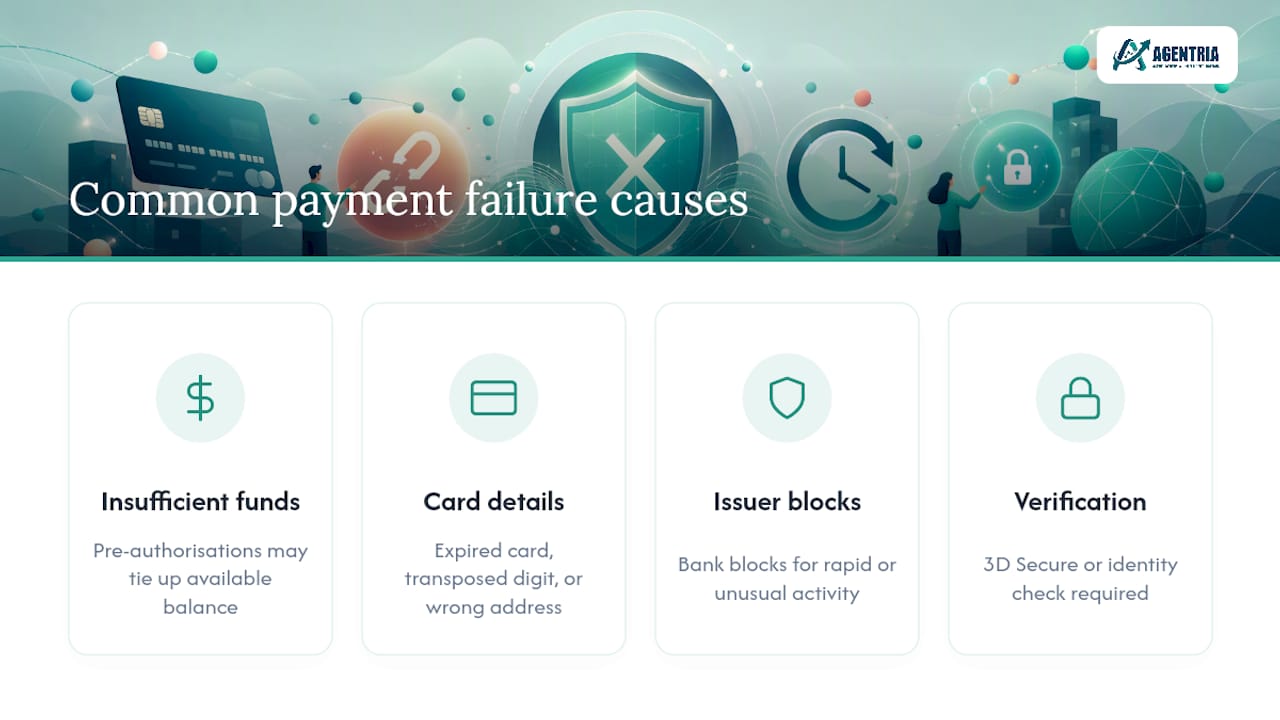
Most failed payments trace back to a handful of repeat offenders, and knowing which one you’re dealing with tells you exactly what to try next.
Insufficient funds or a pending hold. Your available balance might look fine until you notice an earlier pre-authorisation from a hotel, car rental or subscription trial is still tying up funds.
Expired or mistyped card details. A card that expired last month, a transposed digit in the number, or a billing address that no longer matches what your bank has on file will all trigger a decline.
Issuer fraud and velocity blocks. Banks watch for unusual spending patterns. Two attempts in quick succession, a purchase from an unfamiliar country, or spending that pushes past your daily limit can all get silently blocked, and banks typically won’t share the specific decline reason with the merchant, only with you.
Verification requirements. Many merchants now require 3D Secure authentication or an identity check before releasing funds, especially on higher-value transactions.
Processor or network outages. Sometimes nothing is wrong with your card at all. The payment gateway or network itself is having a temporary fault.
One diagnostic detail worth knowing: certain system error codes are known transient faults, and platforms specifically advise waiting roughly 48 hours before retrying rather than repeatedly hammering the same request.
Step-by-step fixes to try right now
Work through these in order rather than jumping straight to “just try again.” Each step either fixes the problem or gathers evidence you’ll need if it doesn’t.
- Capture the evidence first. Screenshot the error, note the exact time, and record the order ID before you do anything else.
- Recheck every field. Re-enter the card number, expiry, CVV and billing address carefully, then retry from an incognito browser window or a different device, since a cached form or a stuck cookie occasionally causes silent mismatches.
- Switch payment methods. If you have a second card, a digital wallet, or the option of a bank transfer, use it. This isolates whether the fault sits with the card or the merchant’s system.
- Wait before retrying again. Immediate repeated attempts often fail for the same reason the first one did, and can trigger a fraud block on top of the original issue. For general declines, give it fifteen to thirty minutes; for a flagged system error code, the recommended window is closer to 48 hours.
- Escalate if it still won’t go through. Stop retrying and contact your bank or the merchant, quoting everything you captured in step one.
Pro Tip: If a retry keeps failing on the exact same payment link, generate a fresh checkout session rather than reusing the old one. Many payment systems expire the underlying authorisation token within minutes, so resubmitting the same stale link can fail even after you’ve fixed the actual problem.
What happens to holds, authorisations and refunds after a decline
A failed payment usually leaves a mark on your statement even though no money actually moved, and that confuses more people than the failure itself.
- An authorisation hold is a temporary reservation of funds, not a completed charge, and it’s normally cancelled automatically once a transaction fails.
- Refunds and reversals from a genuinely failed charge typically post within a few working days.
- Banks can sometimes leave the authorisation visible on your statement for longer than the refund actually takes to process behind the scenes.
- If the charge is still sitting there after roughly ten business days, that’s the point to raise it directly with your bank, since only the issuer can force an early release in most cases.
You generally don’t need to chase this yourself in the early days. Held funds tend to return to your available balance on their own, without any manual recovery step.
When to contact merchant or payment support (and what to send them)
Work through the chain in order: merchant support first, since they can see the transaction on their end; then the payment gateway if the merchant can’t resolve it; then your issuing bank if the block sits on their side.
Whichever you contact, send this in your first message rather than waiting to be asked for it:
- Order or transaction ID
- The exact error code or message
- Date and time of the attempt
- Screenshot of the failure screen
- Last four digits of the card used
Pro Tip: Paste this checklist straight into your first message to support. Agents triage tickets with a complete error code and order ID far faster than ones that just say “my payment didn’t work,” and it often cuts a two or three message back and forth down to one reply.
Why timing and clear communication decide whether a payment recovers
Most failed payments aren’t dead. They’re recoverable if the retry is timed properly and the customer isn’t left guessing what’s happening. Operational data on dunning backs this up: pairing a short customer email sent within about an hour of the failure with a first automated retry six to twelve hours later consistently outperforms either a silent retry or a delayed, generic notice.
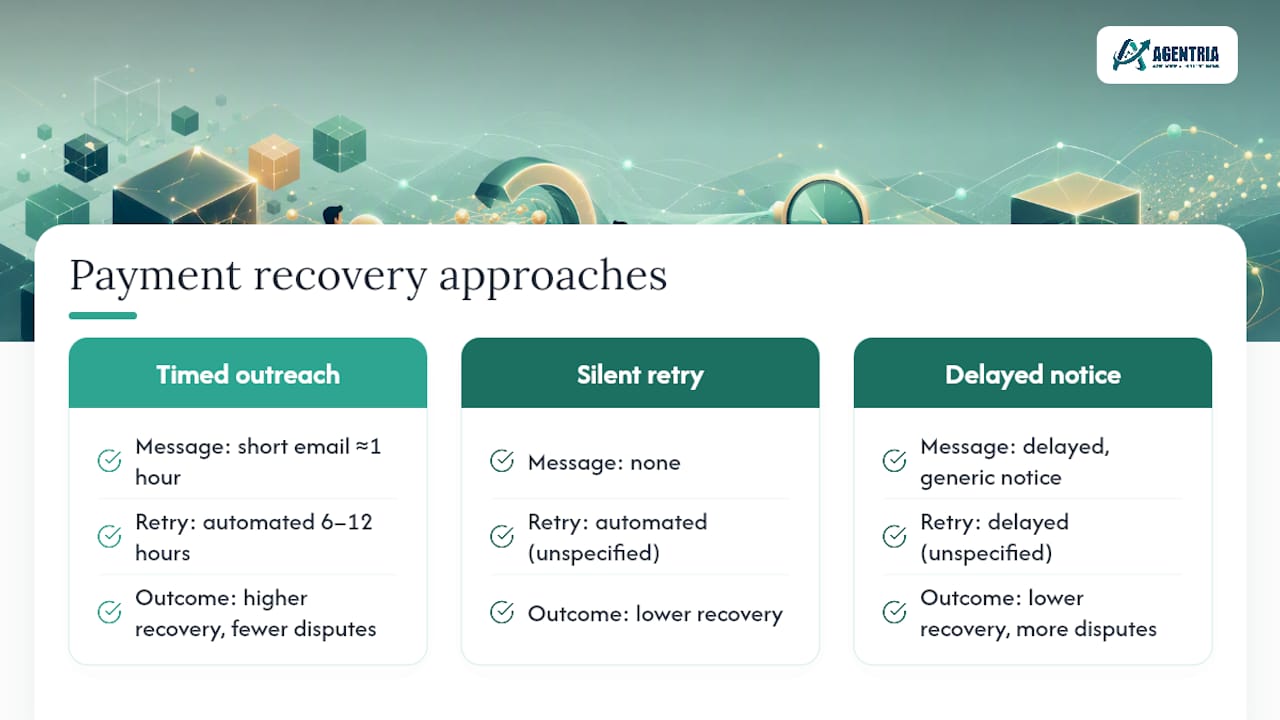
The mistake most support teams make is treating retries and messaging as separate problems. They’re not. A customer who gets a brief, timely note explaining what happened and what happens next is far less likely to abandon the transaction or open a dispute than one who just sees a mysterious hold appear and disappear on their statement.
This is precisely where Agentria’s human-reviewed AI support model earns its keep for operators. Every AI-drafted message to a player still passes through staff review before it sends, coordinating retry timing with omnichannel outreach across email, live chat, SMS and Telegram, while logging every decision to a compliance-ready audit trail.
— AGENTRIA
How Agentria helps operators recover failed payments faster
Failed payments are a support volume problem as much as a payments problem, and for casino operators, every unresolved decline is a player one step closer to walking away. Agentria was built to close that gap without adding headcount or compliance risk.

The platform drafts context-aware replies to failed-payment queries across email, live chat, SMS and Telegram, with every AI-generated response reviewed by a human before it reaches a player. That matters in regulated markets, where a wrong or non-compliant message isn’t just a bad customer experience, it’s a licensing risk. Agentria’s audit trail records every decision made, giving compliance teams a full history without manual logging.
For operators handling failed deposits and withdrawal issues at volume, that combination of speed and oversight shows up directly in recovery rates and response times. See how it works for online casino support teams or book a demo to see the workflow on your own player traffic. Operators running crypto deposits, including partners such as Cardano Casino, face their own version of these insufficient-funds and timing issues, and the same coordinated approach applies whether the payment rail is a card network or a blockchain wallet.
Sources
- Handle payment errors and failures — Payments Direct UI guide
- Troubleshooting transaction issues — MoonPay support
- Failed payment email templates and recovery best practice — Omesta Systems
- Troubleshooting common Google Pay errors
Recommended
See AGENTRIA on your support workflow
Book a walkthrough tailored to your brands, channels, and compliance requirements.